TL;DR
Blue Fox OS is a free Linux workstation that installs by asking the employee to sign in, then configures itself from a record kept in Symbifox, our management suite built on Odoo: language, keyboard, applications, browser extensions, lock rules.
The idea: replace Windows, Active Directory and Group Policy with a single administrative gesture, editing a record, instead of going from machine to machine.
Version 1.0.0 is available in two editions, generic workstation and Microsoft Surface, on the Blue Fox OS download page.
Worth knowing: it replaces Windows, it does not manage Windows workstations. Software that only exists on Windows remains the first obstacle, and the project is young: start with a pilot.
In this article
- Blue Fox OS in a nutshell: a free Linux on Fedora Kinoite and KDE Plasma, driven by Symbifox, Authentik and Nextcloud, with no Windows server.
- What version 1.0.0 contains: two editions, generic and Surface, with Brave, Thunderbird, Nextcloud, Bitwarden and the Symbifox extensions set by the record.
- Installation: you sign in, the machine does the rest: the employee signs in on their phone before the disk is wiped, then the machine configures itself with no local account.
- A Symbifox record instead of Group Policy: the Symbifox Policy module replaces Group Policy, and each workstation rereads its record every day.
- What protects the workstation: a read-only system, all-or-nothing updates with rollback, a signed image and an encrypted disk unlocked by the TPM.
- What already exists elsewhere: Univention keeps Windows workstations, ADSys keeps Active Directory, Blue Fox OS replaces both the workstation and the policy.
- Where it can get more complex: Windows-only software comes first, then the dependency on servers and a young project that calls for a pilot.
- Trying it in your SMB: a pilot in four steps: a software inventory, two or three pilot workstations, a verified key, then three measurements after two weeks.
- At Blue Fox: version 1.0.0 is published as open source, and an existing Symbifox can already configure your workstations.
A new laptop arrives Monday for the new assistant. Someone is going to spend the morning setting it up: create the account, set the Canadian French keyboard, install the browser and the password manager, connect the shared folders, turn on disk encryption, and hope nothing was forgotten. Six months later, nobody remembers exactly what was done on that particular machine.
Large organizations solve this with Microsoft's Active Directory and Group Policy. SMBs often solve it by hand. And since Windows 10 reached end of support, the cost of doing nothing keeps rising: extended security updates cost US$61 per device for the first year, and the price doubles every year after that, according to Microsoft. Year two starts in October 2026.
Blue Fox OS starts from a different premise: the workstation is not an object you configure, it is the reflection of a record.
Blue Fox OS in a nutshell
It is a free desktop Linux, built on Fedora Kinoite with the KDE Plasma interface, the one that looks most like Windows (we covered it in our article on Linux desktop environments). Blue Fox OS adds three things: one identical, signed image for every workstation in an organization, an installation that identifies the person before touching the disk, and a configuration that comes down from the server instead of being done by hand.
On the server side, three tools do the work. Symbifox, the management suite Blue Fox builds on Odoo 18 Community, holds each organization's record. Authentik handles accounts and two-factor authentication. Nextcloud keeps the files. Blue Fox OS does not require a Windows server.
What version 1.0.0 contains
Version 1.0.0 comes in two editions: one for laptops and desktop computers, one for Microsoft Surface tablets, with the kernel and drivers they need. The content is the same, and the same record drives both.
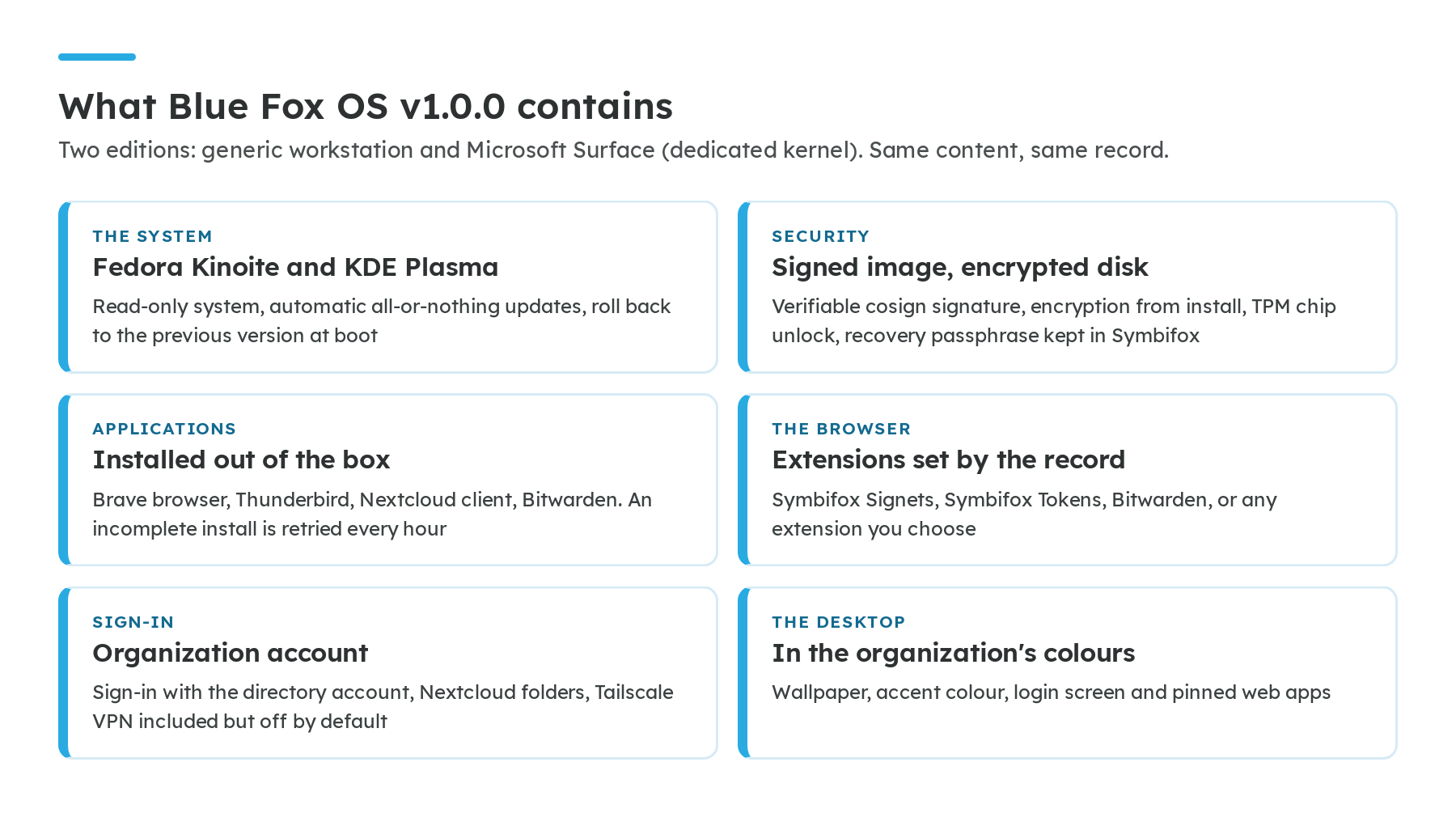
The set of base applications is deliberately short. The browser, email, files and the password manager cover the day of most office workstations. Everything else is added through the record, for everyone or for a single person. Two extensions come from Symbifox: Signets puts the company, team and personal bookmarks in the browser, and Tokens shows the two-factor codes kept in Symbifox.
Installation: you sign in, the machine does the rest
You boot the computer from the installation key, enter the organization's address, and the screen shows a code. The employee enters it on their phone and signs in with their usual account and second factor. That is all we ask of them.
From there, the machine knows who it belongs to. It fetches its configuration from Symbifox, installs itself, names itself, sets the language, keyboard and time zone, and locks the administrator account. No local account is created with a "temporary" password that will linger for years. At first boot, a single screen remains: sign in to Nextcloud, and the team's folders appear.
This sign-in step happens before the disk is wiped. Someone who finds the installation key without an account in the organization does not get a configured workstation.
A Symbifox record instead of Group Policy
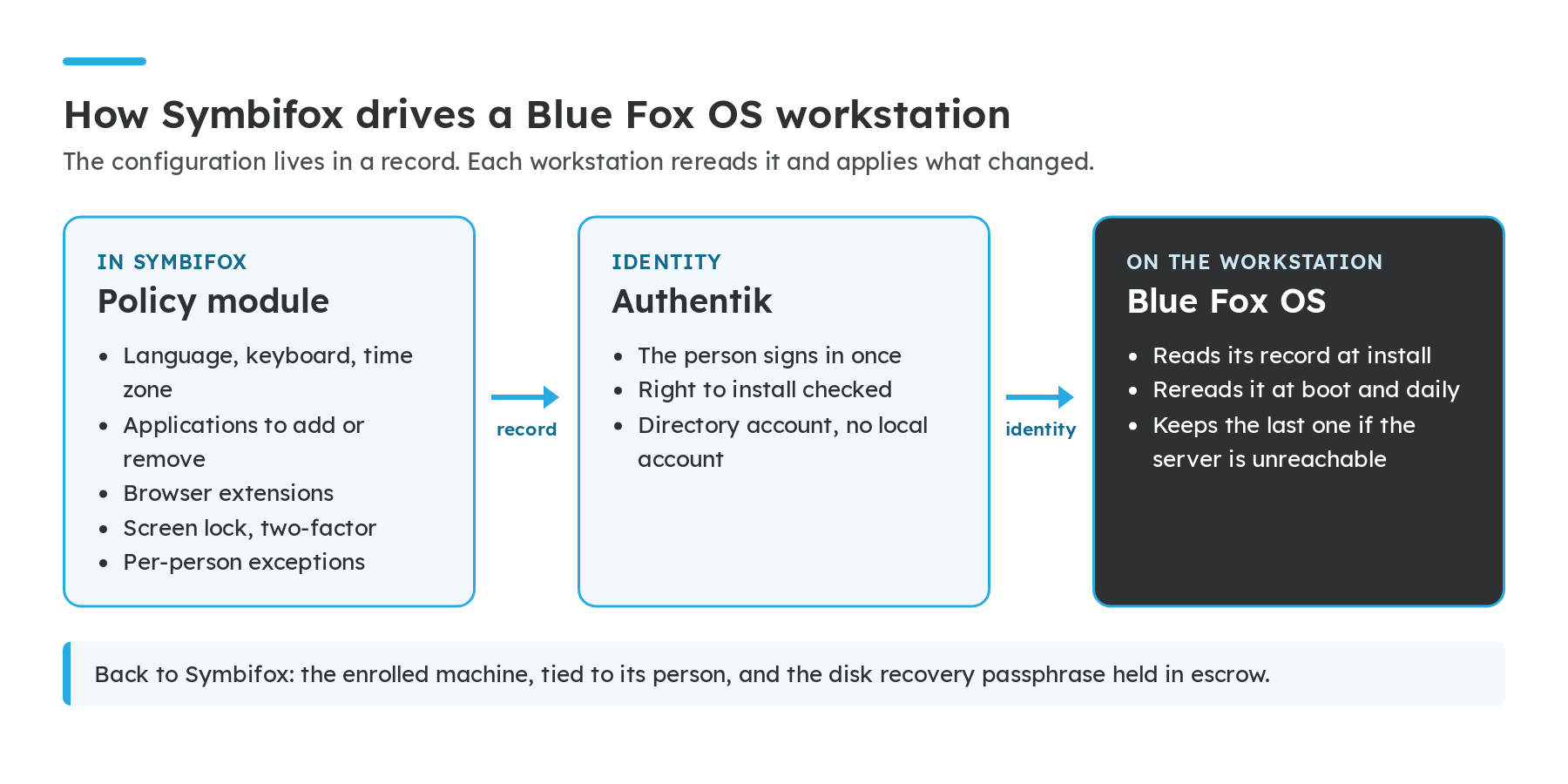
In the Microsoft world, Group Policy describes how workstations should behave. Blue Fox OS does the same job with the Symbifox Policy module: defaults for the whole organization, and per-person exceptions when needed. A second module, Zero-Touch Install, serves the installer the file it reads at boot, taken from the same record. The code of both is published on GitHub, and the Symbifox guide walks through the record screen by screen.
| What the record controls | Examples |
|---|---|
| Installation | Language, keyboard, time zone, machine name, locked administrator account |
| Security | Automatic lock after inactivity, second factor required, time allowed offline |
| Desktop | The organization's colour and wallpaper, Nextcloud folders, pinned web apps |
| Applications | What must be installed everywhere, what must be removed |
| Browser | Extensions required for everyone or for one person: Symbifox Signets, Symbifox Tokens, Bitwarden |
| Permissions | Who is allowed to install a workstation: everyone, a group or a list of people |
The difference that matters day to day: each workstation rereads its record at startup and then once a day. Take a real case. Your accountant needs LibreOffice, the others do not: you add it to their exceptions, and it shows up on their workstation the next morning. Your insurer requires a lock after five minutes: you change the delay once, for the whole organization, and machines already in service follow without anyone touching them. If the server cannot be reached, the workstation simply keeps its last known configuration and keeps working.
Installed workstations also show up in Symbifox, each tied to the person who enrolled it, with its disk recovery passphrase held in escrow. For an onboarding and offboarding checklist, that is an inventory that keeps itself up to date.
What protects the workstation
Blue Fox OS does not claim to be invulnerable. It relies on a few design choices you can explain to an insurer or an auditor:
- A read-only system. The core of the system does not change during use. Malware or a wrong move cannot quietly rewrite it.
- All-or-nothing updates, with rollback. An update applies entirely or not at all, and takes effect at reboot. If the new version causes trouble, you reboot into the previous one. This is how the so-called "atomic" Fedora family works out of the box.
- A signed image. Every version of the system is signed with cosign and comes with the list of its components. You can check that what is installed is exactly what was published. The download page gives the checksum and signature of each file.
- An encrypted disk, and a recovery key that stays with the organization. The disk is encrypted from installation and unlocks with the computer's TPM chip. The recovery passphrase is deposited in Symbifox, encrypted, so that a departure or a forgotten password does not leave a laptop unreadable for the business.
What already exists elsewhere
The idea of managing Linux workstations like a Windows fleet is not new, and it is worth knowing what others do.
Univention Corporate Server and the solutions built on Samba recreate an Active Directory compatible domain: they replace the server, but workstations stay on Windows. ADSys, from Canonical, does the opposite: it applies to Ubuntu workstations the Group Policy of a Microsoft Active Directory that stays in place.
Blue Fox OS takes the third path: it replaces the workstation and the policy, both hosted by the organization. That is also its limit, more on that just below. On the technical side, it reinvents nothing: it is built with the tools of the Universal Blue and BlueBuild communities. What it adds is the link between the Symbifox record, the person's account and the machine.
Where it can get more complex
Software that only exists on Windows. This is obstacle number one, well ahead of the system itself. An accounting package, a device driver or a line-of-business application with no web or Linux equivalent can be enough to keep a workstation on Windows. Blue Fox OS does not manage that workstation: it cannot apply a record to a Windows machine.
You need the servers. Without Symbifox and Authentik reachable at installation, you get a Linux in the organization's colours, but not a configured workstation. The manual installation exists, it does not replace the other one.
Some settings are set once. The machine name, the language and the sign-in mode are applied at installation. Changing them in the record does not change them on workstations already in service.
Removing a machine is not wiping it. Revoking a workstation in Symbifox cuts it off at its next sync, and removing a person from the authorized group has the same effect. But the machine keeps its last configuration: this is not a remote wipe.
The project is young. It has been tested on trial machines, not yet over years of a production fleet. Treat it as such: a pilot on a few workstations before any switchover.
Trying it in your SMB: a pilot in four steps
Nobody should switch a whole fleet to a system they have not seen running in their own office. Here is how we would run a pilot over two to four weeks.
- Take stock of your software. For each workstation, note what only exists on Windows and check whether a web version exists. A workstation that depends on a single Windows program stays on Windows, and that is fine.
- Pick two or three pilot workstations. Ideally people who work mostly in the browser, email and Nextcloud, and a workstation you can put back on Windows without blocking anyone.
- Prepare the key. Download the right edition from the download page, compare the SHA-256 checksum, then write the image to a USB key. For zero-touch installation, your Symbifox needs the Policy module and your record must be filled in.
- Measure after two weeks. How long did each installation take? How many help requests? Which software was missing? Those three numbers tell you whether to extend the pilot or stop there.
A question we often get: what if we want to go back? The pilot workstation reinstalls on Windows like any other computer, and the files stayed in Nextcloud. Nothing is locked into the workstation.
At Blue Fox
Blue Fox OS is a free software project, not a package. We develop it in the open because it answers the question left open by our article on migrating from Active Directory to Authentik: once the accounts are out of Microsoft's hands, what replaces Group Policy on the workstations?
Version 1.0.0 is the first stable release. The Blue Fox OS code is on GitHub, and the Blue Fox OS website shows what Symbifox drives on the workstation. If you already use Symbifox, your workstations can draw their configuration from it today.
If your organization is asking the same question, or if you are looking at your Windows 10 fleet wondering what to do in October, let's talk about your workstations.
Sources
- Microsoft Learn, ESU program for Windows 10: US$61 per device for the first year, doubling every year after
- Microsoft Learn, Group Policy overview: the mechanism Blue Fox OS replaces
- Blue Fox OS, version 1.0.0 release notes: content, editions and file verification
- Symbifox guide, Blue Fox OS workstations: the record, per-person exceptions and machine revocation
- Code of the Symbifox Policy module: what the record describes and hands to each workstation
- Fedora Kinoite: the base of Blue Fox OS, KDE Plasma in an atomic edition
- Fedora documentation, updates and rollbacks: how all-or-nothing updates work
- Universal Blue: the base images Blue Fox OS inherits from
- BlueBuild: the tool that builds the image
- Sigstore, cosign: image signing
- Authentik: accounts and two-factor authentication
- Univention Corporate Server, manual: an Active Directory compatible domain for Windows workstations
- Canonical, ADSys documentation: Active Directory Group Policy applied to Ubuntu