TL;DR: a classic availability poll makes you draw time slots on a blank grid, and then you find out the winning one no longer works. Our module only offers slots that are free in your calendar at the moment you offer them. Three answers instead of two, a response deadline, reminders that stop on their own, and the choice of whether participants see each other's answers. And the vote is only the front door: the winning slot becomes a real meeting, one that carries its agenda, its minutes and the tasks that come out of it, all on the same client record.
In this article
- The blank grid is the actual problem: the times you propose off the top of your head date from the moment you opened the poll, not from your real week.
- Three answers, not two: the middle answer separates the person who can move a lunch from the person who is on a plane.
- Who proposes the times: three ways to start a poll, depending on who knows the group's constraints best.
- What the poll holds in your calendar: hold nothing, place a visible hold, or block it outright: the choice is made meeting by meeting.
- Who sees whose answers: seeing other people's votes helps them converge, except when the committee doesn't know each other.
- The reminders stop on their own: two automatic reminders, at two and five days, then nothing: past that it's the phone-call stage.
- What happens after the vote: the winning slot becomes a real booking, with the event and the invitation, not just a date.
- What Doodle charges for this: the free tier shows ads on the very page you sent your guests, and Pro is listed at US$11 a month.
- The trade-offs worth knowing: it sits on top of the appointment module and depends on it entirely, and it only finds a time with people.
- Other ways to do this: Rallly does the same thing under AGPL-3 and self-hosts, if this comes up twice a year.
The poll closed on Tuesday. The winning slot, Thursday at 10, had already been taken in your calendar since the week before. So you go back to eight people to tell them no after all, and you start over.
That is not bad luck, it is the direct consequence of how these tools work. You get a blank grid, you paint time slots on it from memory, and nothing in the exercise checks that you are actually free at those hours. The poll collects honest answers to a badly framed question.
The blank grid is the actual problem
When you propose slots off the top of your head, you are working from a mental picture of your week that dates from the moment you opened the poll. Several days pass between then and the closing. A client books, an internal meeting moves, a personal appointment gets added. The grid, meanwhile, does not move.
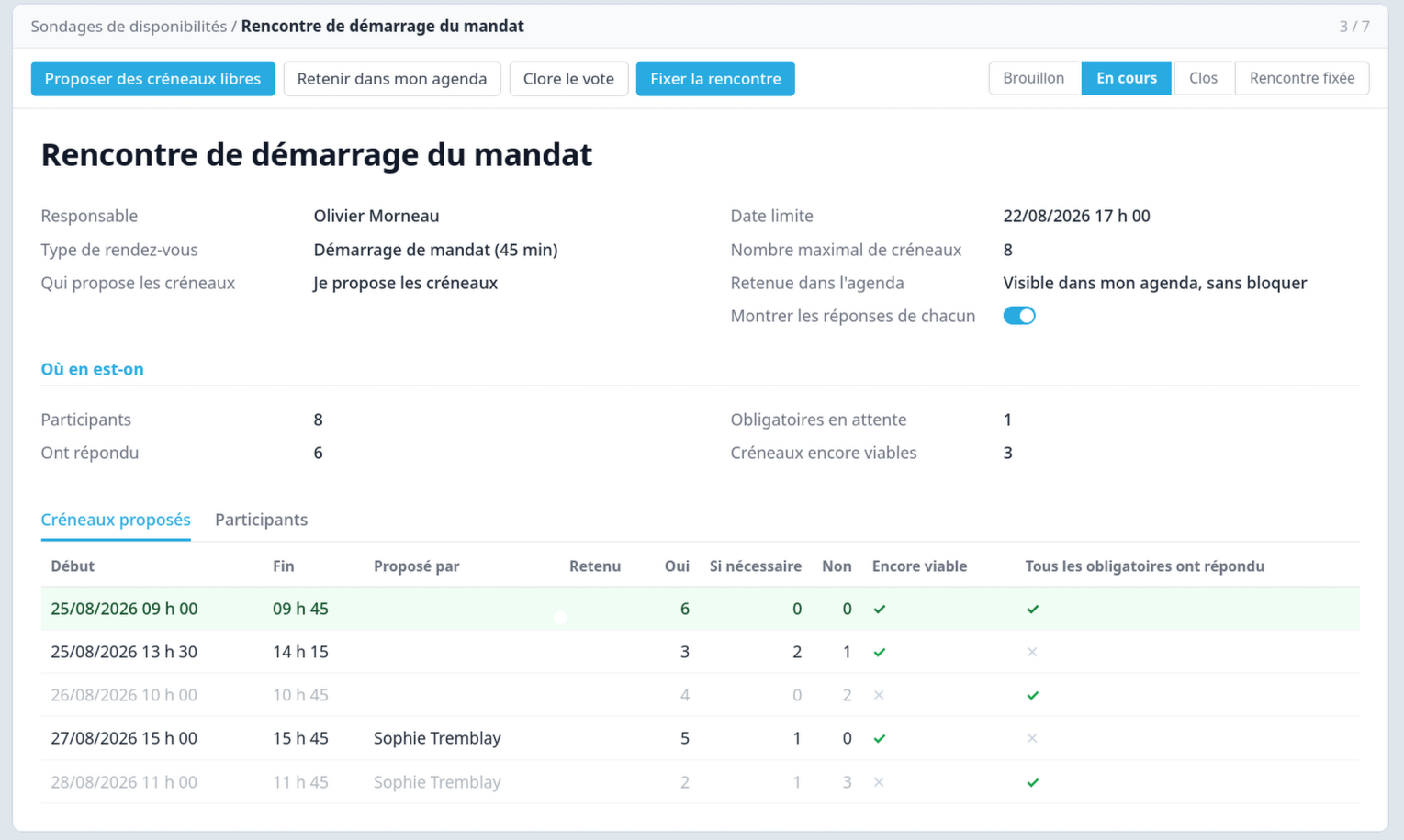
Our poll starts from the other end. The slots put to a vote are drawn from your real availability, the same availability a client would see booking directly on your public page. A slot that shows up in the poll is a slot you can honour, because it comes from the calendar and not from a memory.
The default cap is eight slots. That is not a technical constraint, it is an observation: past ten or so choices, the response rate collapses. People open the email, see a wall of checkboxes, and put it off.
On your invitees' side there is nothing to install and no account to create. They get a link, they land on a page built for a phone, and they answer with one tap per slot. That is the bare minimum for an availability poll, and it is also why these tools caught on: the person you invite should not have to learn anything.
The hours are shown in a single time zone, named by its city on the page. That looks like a detail right up until the day two participants show up at two different times for the same meeting, each one certain they read it correctly.
Three answers, not two
Yes, If need be, No. That middle answer is what unblocks most polls, and its absence is what sends the others in circles. Without it, the person who could move a lunch ticks No, just like the person who is on a plane. Two very different constraints land in the same box, and you have no way to tell them apart.
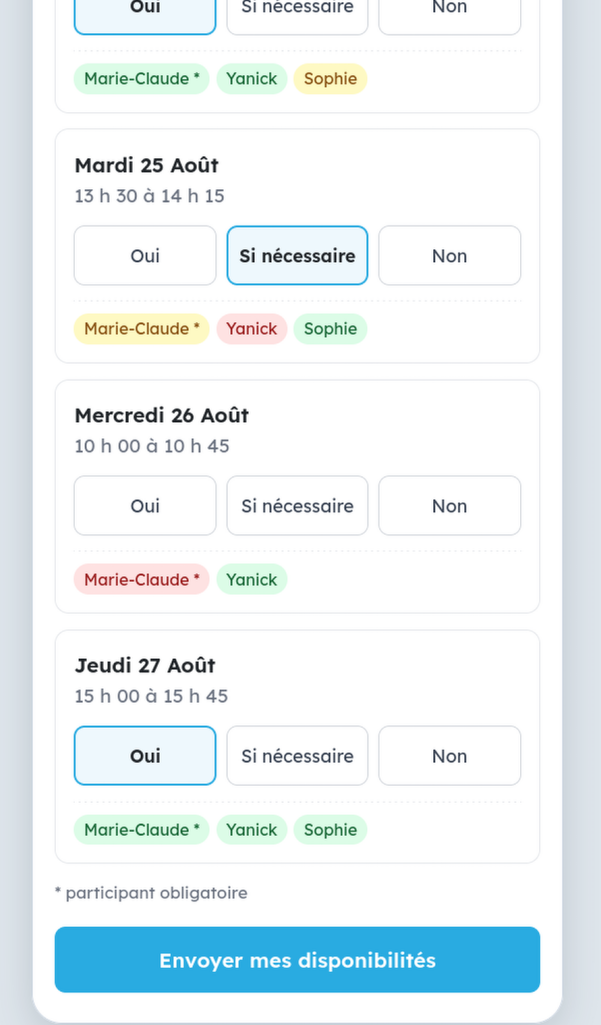
Participants do not all carry the same weight either. Each one is marked required or optional, and the distinction has a concrete consequence: the moment a required participant answers No, the slot stops being viable and drops out of the count. You do not have to do that sorting yourself by re-reading the grid. The slot where the managing director is unavailable is no longer a candidate, even if it is collecting Yes answers.
Who proposes the times
Three ways to launch a poll, depending on who around the table knows the group's constraints best.
You propose. The default mode. You pick the slots from your availability, everyone answers. The classic way of working, just more reliable.
A guest lays the first grid. The first person puts up the slots, the others answer them afterward. Useful when someone is leading the file and knows better than you what is workable for the group. You can designate that person in advance, which keeps the luck of the inbox from deciding who frames the meeting.
Everyone proposes their own. Each person ticks what suits them inside your availability, and the overlap forms by itself. This is the mode that saves you from guessing. A per-person limit applies, five slots by default, because without a cap someone ticks thirty and drowns the overlap in noise.
What the poll holds in your calendar
An open poll creates a grey zone: those hours are neither free nor taken. Three possible positions, and the choice is made meeting by meeting.
You can hold nothing at all, and accept that the winning slot may have gone in the meantime. You can place a visible hold, which shows up in your calendar so you can see the poll in progress, but still lets public bookings through on those hours. Or you can genuinely close the slots to any other booking for the duration of the vote, which guarantees the meeting at the cost of a few hours tied up.
The third option is the right one for meetings you cannot afford to lose, and the wrong one for everything else: blocking eight slots for five days on every poll empties a calendar in a hurry.
Who sees whose answers
By default, the voting page shows who answered what. That is how consumer polls behave and it does help: seeing that a slot already has three Yes answers pushes people to rally to it rather than hunt for something better.
That behaviour can be turned off, and there are situations that call for it. A committee whose members do not know each other. A poll that mixes people from three different organizations, for whom knowing that a given executive is never free on Friday afternoons is none of their business. Each person then sees their own answers and nothing else.
It is worth a second's thought before sending: an availability is personal information, and a poll that crosses three companies broadcasts a few dozen of them at once.
The reminders stop on their own
There is always one person who does not answer. The poll carries a deadline, and two reminders go out automatically to those who have not voted yet, at two days and at five days. After that it stops. Past that point, chasing lowers the response rate instead of raising it, and you are at the phone-call stage anyway.
Those reminders do not go out until someone on your side decides they should. They write to people outside your organization, in your name, so the setting is deliberately off to begin with. That is a business decision, not a configuration oversight.
What happens after the vote
A poll that finds a date and stops there has not done you much of a favour. The bulk of the work around a meeting sits on the other side of the vote, and that is where an outside tool drops you.
When the poll closes, the winning slot becomes a real booking: the event in your calendar, the invitation file your invitees add to theirs, the video room if there is one, and the reminders. If you asked questions when inviting, the answers are already in the meeting description. The voting page and the emails carry your branding, not a vendor's.
That calendar event then becomes the thread everything else hangs from. The agenda attaches to it, so do the minutes, and both point at the same client record as the booking. A dashboard follows your meetings across seven steps: draft the agenda, review it, send it, hold the meeting, draft the minutes, review them, send them. You can see at a glance which step is dragging, and on which meeting.
At the end of the chain, the decisions made during the meeting become assigned tasks in the same project. It is our meetings module that takes over from there. The poll will only have been the front door.
None of this conjures itself, and that is deliberate: a fifteen-minute internal meeting does not need a formal agenda, and there is a setting to say so once and for all. What changes is that none of these steps asks you to go find the information somewhere else or key it in again. The outside poll stops at the date and leaves you to restart the chain by hand.
What Doodle charges for this
Doodle is still the reference tool, and its free version is narrower than people remember. It gives you one group poll, one booking page, one 1:1 and a single calendar connection. And it displays ads, on the page you just sent your invitees.
| Feature | With Doodle |
|---|---|
| More than one group poll at a time | Paid plan |
| Response deadline | Pro |
| Automatic reminders | Pro |
| Hiding participants' answers from each other | Pro |
| No ads shown to your invitees | Pro |
| Your branding on the pages and emails | Team |
The Pro plan is listed at USD 11 per month on annual billing, and USD 15 if you pay monthly. The Team plan goes to USD 16 per seat per month on annual billing, with a two-seat minimum. The Enterprise tier starts at USD 15,000 a year. Those are US dollars, which adds a layer for an organization based here.
The amount is not really the point. It is that the deadline, the reminders and the confidentiality of the answers are exactly the three things that make a poll actually conclude, and all three sit behind the paywall.
The trade-offs worth knowing
This poll does not stand on its own. It rides on our appointment booking module and depends on it entirely. If your availability is not already in your ERP, there is nothing to query.
It is not a general-purpose polling tool either. It finds a time with people. For picking a restaurant or voting on a logo, it does not do the job, and that is not what we ask of it.
The constraint it starts from is deliberate and some people will chafe at it: you do not paint freely on a blank grid. The slots come from your availability. That is what makes the winning one hold, and it is also what stops you from offering a Tuesday evening outside your business hours because it happened to suit everyone that once.
The single time zone has a downside. Invitees in another province see the time in your zone, labelled but not converted, and the arithmetic is on them. For a local poll that changes nothing, for a committee stretching from Vancouver to Halifax it is one more piece of friction.
There is also a silent failure mode, and it deserves to be named: a mistyped email address produces no visible error, it produces a person who never answers. When someone is dragging, check their address before concluding they are ignoring you.
Finally, no automation replaces the phone call to the person who never opened the email. Reminders buy you time, they do not close files on your behalf.
Other ways to do this
If all you need is to find a date twice a year, a free tool does the job perfectly well and nobody needs to sell you anything else.
On the open-source side, Rallly does exactly that, under the AGPL-3 licence, and you can host it yourself. It is the most direct equivalent to Doodle without the paywall. And if you already run Nextcloud, its Polls app is already there, with nothing more to install.
What neither of them does is close the loop: the chosen slot stays a line in a polling tool, and someone still has to create the meeting, invite everyone, prepare the agenda, write the minutes and attach all of it to the right client record. That is where ours earns its place, not on the voting function itself.
Our recommendation
Before launching a poll, four questions that settle the settings:
- Who in this group cannot miss the meeting? Those people are required, the others are optional.
- Can I afford to lose the winning slot? If not, genuinely close the slots for the duration of the vote.
- Do these people all work for the same organization? If not, hide the answers from each other.
- Who knows the group's constraints best? If it is not you, let that person lay the first grid.
The poll is part of Symbifox, our suite of modules that add on to Odoo Community. Like the rest of the suite, the code is published and you can run it on your own server.
Do you coordinate meetings of six or eight people every week? Let's talk about how you settle on dates.
Sources
- Doodle, plans and pricing: what the free plan includes, the ads it displays, and the features reserved for the Pro, Team and Enterprise plans.
- Rallly: the open-source equivalent of Doodle, self-hostable.
- Rallly source code: the public repository and the text of the AGPL-3 licence.
- Polls for Nextcloud: the built-in polling app, for organizations already running Nextcloud.
- Symbifox: the module catalogue and the pricing table.