TL;DR: an NFC tag stuck on a fire extinguisher, a door or a projector costs less than a dollar. Hold the phone near it, and the gesture runs in Odoo: the visit is logged, the equipment changes hands, the room is taken, the inspection checklist opens. What is engraved on the chip is a public code, never a secret: identity comes from elsewhere, and that is what separates the three ways of tapping a tag. The gesture always runs with the rights of the person tapping, never more. With no network, the tap is kept with its time and leaves when the signal returns. And when the tag asks for a checklist, the result is no longer “somebody came by” but “here is what they saw”, with the issue followed to its correction and the register coming out as a PDF.
In this article
- A one-dollar chip, and the phone you already have: the chip only opens a link, and the server decides the gesture, so a tag stuck last year plays a gesture written this month.
- What a tag carries, and what it will never carry: a short, public, randomly drawn code, never a secret: identity comes from the phone, the session or a signed chip.
- The gestures that come with it: log a visit, lend equipment, take a room, record attendance, report a problem, and nothing acts on merely opening the link.
- From a visit to a reading: the checklist that becomes a register: the checklist turns "somebody came by" into "here is what they saw", and a reading is never rewritten: what gets added is the correction.
- What the regulation asks for: NFPA 10 calls for a visual inspection at least every thirty days, and section 205 of the RSST sets the five items of the padlock register.
- The basement where there is no network: the tap is kept with its time and leaves when the network returns, within a three-day window, and some gestures refuse deferred sending.
- And the phone with no NFC: every tag has a QR code twin printed from Odoo, because one blocked person is enough to send everybody back to the card.
- What this does not solve: our engraving app is Android only, an ordinary tag can be copied, and no software detects a checklist filled in without looking.
- The other ways of doing it: commercial round systems work, but the round stays in their system and the visit never becomes a task assigned to somebody.
- Our position: we deploy where there is already an Odoo, under BUSL-1.1 turning into LGPL-3 after four years, with the app on our F-Droid repository.
On the back of a lot of fire extinguishers there is a small card. A column of months, one box per month, initials in pencil. Someone walks by, looks at the gauge, signs off. That card is the only proof the monthly check happened, and it lives on the device itself: if it peels off, gets wet or leaves with the extinguisher at recharge time, there is nothing left.
The same story repeats everywhere. The loaner laptop you find three months later on somebody else's desk. The closing round nobody can say was done yesterday. The keyed-alike padlock handed to a contractor, written on a scrap of paper at reception. These are not software problems: they are gestures made standing up, in a corridor, that never reach the system because reaching it would mean going back to a computer.
A one-dollar chip, and the phone you already have
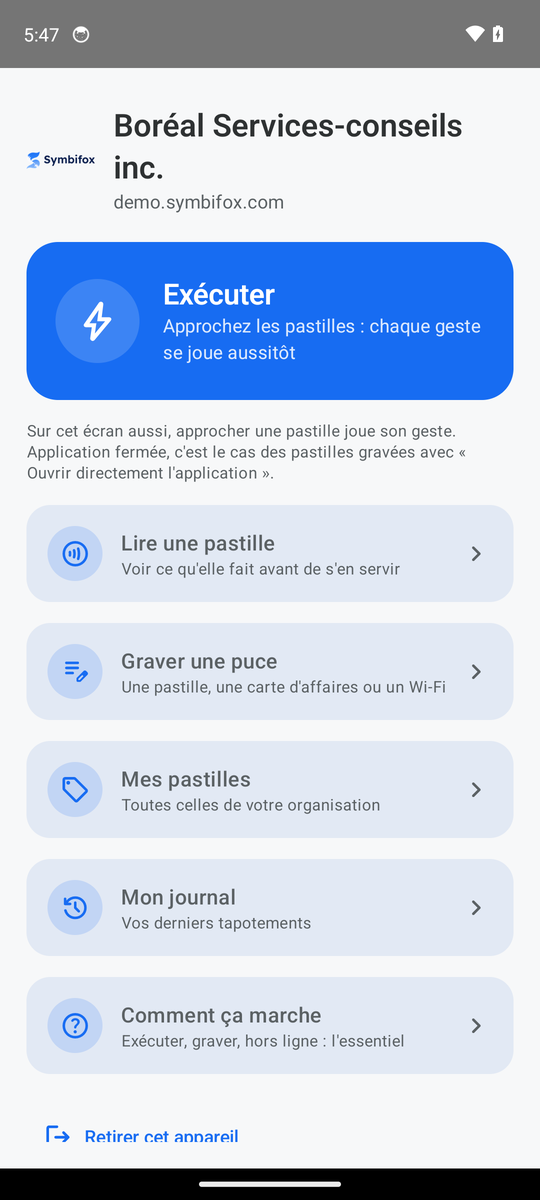
An NFC tag is a sticker with a chip inside. Hold it near a phone, the phone reads it from four centimetres, and that is all it knows how to do. It triggers nothing by itself: it carries a few dozen bytes, and the only format both mobile platforms read without an app is a link. The phone opens that link, and the server acts.
That sounds like a technical detail, but it is what makes the whole thing liveable. Adding a new gesture does not mean updating the phones, or re-engraving the tags already on the wall: the decision sits on the server side. A tag stuck last year plays a gesture written this month.
What a tag carries, and what it will never carry
A short, public, randomly drawn code. Nothing else.
That is a decision, not a technical limit. A chip can be read without anyone's consent, through a pocket, and copied onto a blank chip for pennies. Whatever you engrave on it is a poster, not a secret. A password, a token, an access key: none of that belongs on a tag, and anyone selling you one that “holds” your credentials is selling you a problem.
Identity comes from elsewhere. That is exactly what separates the three ways of tapping a tag.
| The door | Where identity comes from | For whom |
|---|---|---|
| The Android app | The phone's token, paired once with the person's account | The team |
| The browser | The session already open in Odoo | Anyone with an account, on any phone |
| The signed tag | An NTAG 424 DNA chip that signs every read, with a counter that never goes backwards | A tag handed to someone who has no account |
In all three cases, the gesture runs with the rights of the person tapping. A tag pointing at a record they may not see stays closed, and says so politely. A tag is not a pass: it is a shortcut to what you already had access to.
The gestures that come with it
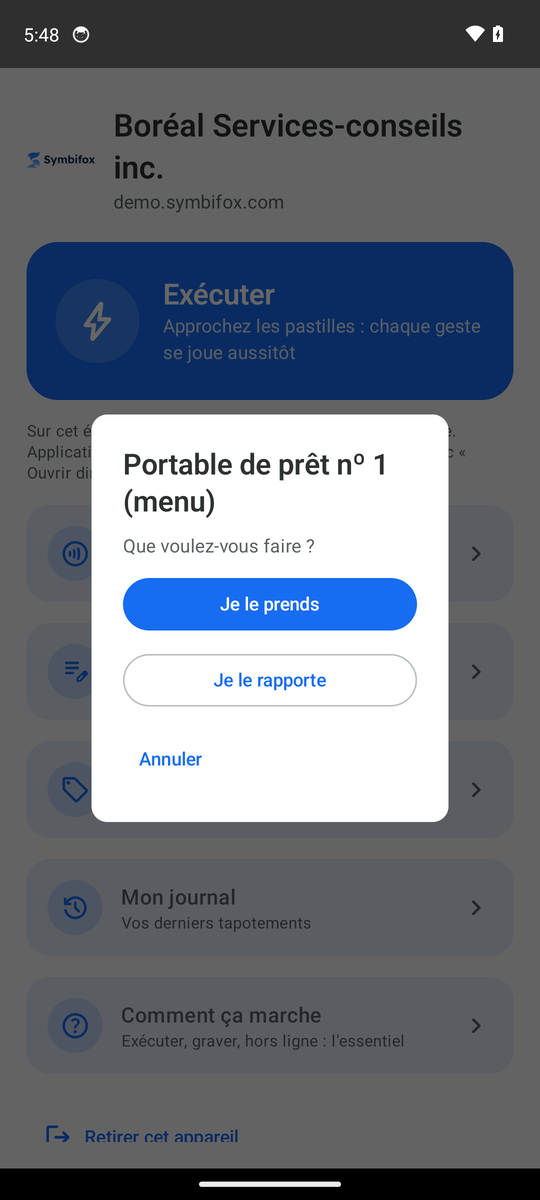
Open a record. Log a visit. Take or return a piece of equipment. Take a meeting room at its door, confirm it, release it. Record attendance at a training session or a meeting. Tap the checkpoints of a round in order. Report a problem, which opens a ticket already filled in: the customer, the place, the person, the time.
Two behaviours are worth naming, because they run against what you expect from a link. First, nothing acts on merely opening the link. A link preview in a messaging app, a spam filter, a security scanner: they all open the addresses they see, without anyone touching anything. So a gesture that changes data goes through a confirmation. Second, a tag can ask a question instead of acting: buttons, sometimes a sentence to type. Anything the gesture would have touched before asking is undone, and the choice is what acts, in a second send.
From a visit to a reading: the checklist that becomes a register
A timestamped visit proves someone came by. It does not prove what they saw. That is the difference between a guard's round and an inspection.
So a tag can ask for a checklist before it records: conforming or not for each item, a measured value with its acceptable range, a choice among a few answers, a free note. Is the extinguisher in place and accessible, the signage visible, the gauge in the normal zone, the seals intact? The reading that comes out carries the item checked, the place, the time, the name of whoever checked and the result line by line.
That reading is never rewritten. It may be the single most important rule in the whole set: a register you can correct after the fact proves nothing any more. What gets added to a reading is the correction: what was done, by whom, on what date. The issue itself creates a task for the person in charge of the checklist and stays open until the correction is logged.
What the regulation asks for
In Quebec, the Building chapter of the Safety Code adopts the National Fire Code and requires fire protection equipment to be inspected and maintained according to its own standard. For a portable extinguisher that standard is NFPA 10, which calls for a visual inspection at least every thirty days. The monthly check needs no specialist: it is a glance the owner can do themselves. What is usually missing is not the skill, it is the record.
Same logic on the lockout side. Quebec's occupational health and safety regulation first asks that the name of the person installing the padlock appear on the padlock itself. An employer may instead hand out padlocks with no name on them, but section 205 then requires a register, and sets its minimum content: the identification of each uniquely keyed padlock, the name and phone number of the person receiving it, those of their employer where there is one, then the date and time it was handed out and the date and time it came back. A tag on the padlock box writes those five items at hand-out and at return, not the following Friday from memory.
Starter checklists ship with the module: extinguishers, emergency lighting, exit signs, fire doors, alarm panel, first aid kit, padlocks, playground. They arrive flagged “To validate” when their content comes from a summary of the standard rather than from the standard itself. You are asked to confirm them against the real equipment before using them, for three reasons.
- A standard is bought and updated: what is true this year is not necessarily true in three years.
- Your insurer or your fire department may require more than the regulatory minimum.
- A register filled in against the wrong checklist is worse than an empty one, because it looks complete.
The basement where there is no network
The mechanical room, the underground parking, the metal-clad warehouse: those are exactly the places with extinguishers to check and no signal. The app then keeps the tap with the time recorded by the phone and sends it when the network is back. The checklist of a tag already read once stays available offline, so it gets filled in anyway.
Two guardrails come with that. The server only accepts a deferred time if it is less than three days old and not in the future. And some gestures refuse to be deferred, because they only make sense on site and right away: taking a meeting room last night means nothing.
And the phone with no NFC
There are still some, and above all there are visitors, contractors, people whose phone lives in a thick case. So every tag has a twin: a label with a QR code, printed from Odoo, that leads to exactly the same place. Same gesture, same rights, same confirmation. It is the kind of detail that decides whether a rollout holds, because one blocked person is enough for everybody to go back to the card.
What this does not solve
Our engraving app is Android only. An iPhone reads a tag and plays its gesture without installing anything, and since iOS 13 it can write an NDEF tag too, but with an app other than ours. On our side, engraving therefore goes through an Android phone, or a commercial programmer. In a team, a single device is enough to lay out the whole fleet.
An ordinary tag can be copied. If what matters is that a specific person be physically in front of the device, you need a signed chip, which costs a few dollars rather than a few cents. For a closing round, copying is not a realistic concern. For a register handed to a third party, it is.
You also have to accept that a tag peels off, gets painted over, or leaves in the bin with the equipment. The log shows the tags never tapped, which gives a fair idea of the ones that disappeared, but nothing replaces a check-up tour once a year.
Finally, it does not do the work. A checklist neatly filled in by someone who never looked at the extinguisher is a false document, and no software catches that. What the system changes is the cost of doing it right: when logging takes eight seconds standing in front of the device, there is no longer a reason to put it off.
The other ways of doing it
Commercial patrol systems have been around for a long time: a rugged reader, checkpoints, software that produces reports. They work well and they cost what they cost, in hardware as in subscription. Their real limit is elsewhere: the round lives in their system, the equipment in yours, the tickets in a third one. The visit never becomes a task assigned to someone.
The card on the back of the extinguisher does have a real advantage worth acknowledging: it never breaks down. What it does not do is warn anyone when the month's box stayed empty.
Our position
We deploy tags where there is already an Odoo, because the point is not the tag: it is that the visit lands next to the equipment, the ticket, the timesheet and the client file. A tag wired into a separate system recreates exactly the silo you were trying to remove.
The modules are published in the Symbifox public repository under BUSL-1.1, which converts to LGPL-3 four years after each version: the code is readable today and free afterwards. The Android app is distributed through our own F-Droid repository, with no app store in between. The guide chapter on NFC tags describes every screen, and the module catalogue says which ones are public.
A typical rollout fits in one session: you stick the tags, start from a template to create the round and its checkpoints in one step, print the labels, and engrave the fleet with a phone. The longest part is not the technology, it is deciding what gets checked. Let's explore this together.
Sources
- Régie du bâtiment du Québec: the Building chapter of the Safety Code, which adopts the National Fire Code 2020.
- National Research Council Canada: the National Fire Code of Canada, 2020 edition.
- NFPA 10: the portable extinguisher standard, source of the inspection at least every thirty days.
- CNESST: the guide on lockout and other energy control methods.
- Regulation respecting occupational health and safety: section 205 and the minimum content it sets for the register of uniquely keyed padlocks.
- NFC Forum: the NDEF specifications, the format both mobile platforms read without an app.
- NXP NTAG 424 DNA: the chip that signs every read and carries a counter that never goes backwards.
- Android: the NFC documentation, reading side and writing side.
- Apple: reading an NFC tag with an iPhone, without an app.