TL;DR :
Odoo Community's Expenses module lets you manage expense reports from A to Z, with no shared Excel file and no email approvals.
Employees submit their expenses with receipts, the manager approves with one click, and everything is reflected automatically in accounting.
It's included in Odoo Community (free and open source), it works as of version 18 (and even earlier), and it eliminates a good chunk of the administrative chaos.
We'll explain what it does, what it doesn't do, and how we deploy it.
In this article
- What the module actually does: entry by the employee, approval, and integration with the rest of the ecosystem.
- The real gain: visibility: the problem with a spreadsheet isn't that it's dated, it's that it gives no real-time visibility.
- Excel vs Odoo Expenses: what changes: the two side by side.
- Community vs Enterprise: what do you lose?: what Enterprise adds, starting with automatic receipt scanning.
- Setup: easier than you think: one of the simplest deployments in Odoo, in a few steps.
- Where it falls short: no OCR in Community: the amount, the date and the supplier are typed in by hand.
In many SMBs and non-profits in Quebec, expense management still looks like this. A shared Excel file on the network (or worse, on someone's desktop), paper receipts piling up in envelopes, "can you approve my expense report?" emails getting lost in inboxes, and someone in finance manually re-entering everything at the end of the month.
It works, in the sense that people eventually get reimbursed. But it's slow, it's fragile, and nobody has a clear picture of expenses in real time. And when audit time comes around, it's a scramble for missing receipts.
Odoo Community's Expenses module exists precisely for this. And contrary to what you might think, it's not reserved for the paid Enterprise version.
What the module actually does
The Expenses module (hr_expense) has been included in Odoo Community for several versions. In version 18, it's mature and well integrated with the rest of the ecosystem. Here's what it does:

Employee expense entry.
Each employee can create their own expense lines directly in Odoo. You select the category (meals, travel, accommodation, supplies), enter the amount, the date, and attach the receipt as a photo or PDF. No need to fill out an Excel form with 14 columns (we don't insert rows, folks, please?).
Four ways to create an expense.
Manual entry in the interface, receipt upload, drag and drop a file onto the dashboard, or email a receipt to a dedicated address. This last option is particularly handy for employees on the road: snap a photo of the receipt with your phone, email it, and the expense is automatically created in Odoo.
Grouped into expense reports.
Rather than submitting each expense one by one, you group them into a report. A three-day business trip? Put the hotel, meals, and transport in the same report, and the manager approves everything with one click.
Built-in approval workflow.
The employee submits their report, the manager gets a notification and can approve or reject. No more chasing approvals by email. The permission system is simple: only users with the "Team Approver" role can validate their team's reports. Conversations and comments go through Odoo's chatter, so everything is tracked.
Direct accounting integration.
Once the report is approved, journal entries are automatically created in the appropriate accounts. No manual re-entry, no risk of data entry errors, no delay between approval and posting.
Client reinvoicing.
If an expense is incurred on behalf of a client (travel to a client site, materials purchased for a project), you can link it to a sales order. The expense will automatically appear on the client's next invoice. No more reinvoiceable expenses slipping through the cracks.
The real gain: visibility
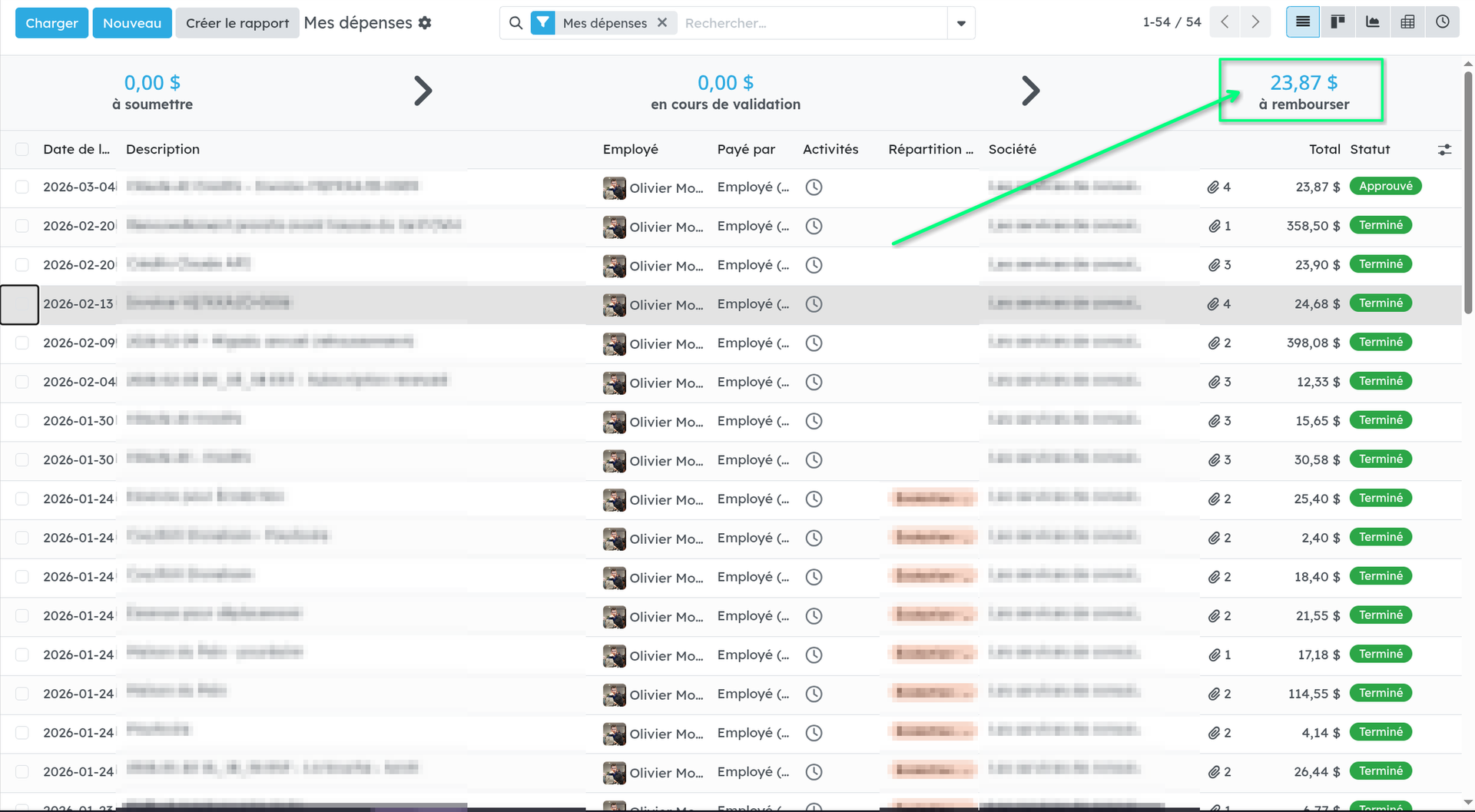
The fundamental problem with Excel files isn't that they're ugly or outdated. It's that they give zero real-time visibility. The manager doesn't know how many expenses are pending approval. The CFO can't see trends without manually compiling data. And the employee has no idea where their reimbursement stands.
With Odoo's Expenses module, every expense has a clear status: draft, submitted, approved, posted, paid. The employee sees where their report stands. The manager sees what's waiting for approval. Leadership has a snapshot of expenses by category, department, and period.
It's not revolutionary. It's just basic structure. But when you go from an Excel file to this, the effect is immediate.
Excel vs Odoo Expenses: what changes
| Shared Excel file | Odoo Expenses (Community) | |
|---|---|---|
| Entry | Manual, prone to formatting errors | Guided form with predefined categories |
| Receipts | Paper envelope or cluttered network folder | Attached directly to each expense line |
| Approval | Email or handwritten signature | One click, with permissions and traceability |
| Posting | Manual re-entry at month-end | Automatic upon approval |
| Visibility | None in real time | Statuses, filters, reports by category |
| Reinvoicing | Manual tracking with risk of oversight | Linked to sales order automatically |
| Audit | Painful reconstruction | Complete history with attachments |

Community vs Enterprise: what do you lose?
We recommend the Community version by default, but let's explore anyway what the Enterprise version adds to the Expenses module:
Automatic scanning (OCR) included by default.
In Enterprise, you can scan a receipt and Odoo automatically extracts the amount, the date, and the vendor using artificial intelligence. In Community, you have to enter this information manually.
It's the most concrete advantage of Enterprise for this module. Worth noting: in the Community version, it's entirely possible to integrate OCR-based workflows, or even an AI integration, to process part of the information automatically.
Native mobile app.
Enterprise offers a full mobile application for expense entry. In Community, you use the web interface (which is responsive and works on mobile, but it's not a native app).
Advanced multi-level approvals.
Community offers a simple approval workflow (employee → manager). Enterprise allows more complex approval chains with amount-based thresholds.
For most SMBs with 5 to 50 employees, Community's simple approval workflow is more than enough. And when you're looking to fill a gap that doesn't exist yet, you're in good company with the OCA.
Setup: easier than you think
Deploying the Expenses module is one of the simplest in Odoo. Here are the main steps:
1. Install the module.
You activate "Expenses" in the apps. The HR module (which manages employee records) installs automatically as a dependency. If you're already using Odoo for accounting or projects, it's literally one click.
2. Configure expense categories.
You create categories that match your reality: business meals, mileage, accommodation, supplies, subscriptions. Each category is linked to an accounting account, so entries are posted to the right place automatically.
3. Set up access rights.
You assign the approver role to the relevant managers. Employees only need basic access to submit their expenses.
4. Configure the email address (optional).
You create an email alias (for example expenses@yourcompany.com) to allow expense submission by email. Handy for employees who travel a lot.
In practice, you can have a working system in one day of configuration. The real timeline is the change management effort to get employees to adopt the new process.
Where it falls short
We'd rather tell you upfront than let you find out the hard way:
No OCR included by default in Community. We mentioned it, but it's worth repeating. You have to manually enter the amount, date, and vendor. For someone submitting three expenses a month, it's not a pain point. For a sales rep submitting 30, it can get tedious.
Blue Fox hosts your Odoo Community instance?
We can integrate artificial intelligence securely and privately to help you automate your workflows.
Expense policies are basic.
Odoo Community doesn't let you set automatic caps per category (for example: maximum $75 per meal). The manager has to check manually. With Enterprise or OCA modules, you can add more sophisticated rules.
Basic reporting is functional, nothing more.
You can filter, group, and export data. But if you need advanced visual dashboards with trend charts, you'll need to export to a BI tool or use Enterprise dashboards.
No advance management without an add-on module
If your organization works with cash advances (you give the employee $500 before a trip, and they account for it afterwards), Odoo Community doesn't handle this flow natively. You'll need to manage it through manual journal entries or an add-on module.
Our approach
At Blue Fox, we deploy Odoo Community's Expenses module as part of the Odoo implementations we do for SMBs and non-profits in Quebec. It's a module that delivers quick results: the time savings are visible from the very first reimbursement cycle. Team members generally find this transition very positive!
We configure expense categories based on your chart of accounts, set up the approval workflow to match your structure and business rules, and train your team on using the tool. No per-user licensing, no recurring fees for the module: it's open source software, hosted in Quebec, under your control.
For organizations with more advanced needs (OCR, multi-level approvals, cap policies), we evaluate on a case-by-case basis whether an OCA community module can fill the gap or if additional development might be advisable. But in 90% of cases, Community does exactly what's needed, right from the first time you open it.
Still managing your expense reports in Excel? Let's talk about your situation.