TL;DR: our email management module puts a real inbox inside Odoo. Each team member connects their own mailbox, emails attach to the right client file in two clicks, and conversation history stays with the company instead of sleeping in personal mailboxes. Works with Microsoft 365, Gmail and any standard email provider.
In this article
- Copy-paste, the symptom of a system that doesn't hold up: truncated text, no attachments, no rest of the thread, pasted in by the one person who thought of it.
- An inbox right inside your ERP: everyone connects their own mailbox with their own credentials, no shared account, no team password.
- Sorting that takes care of itself: rules like the ones in Outlook: a list of conditions, a list of exceptions, then what you want to happen.
- What changes when someone is away: the colleague covering opens the task and reads the whole exchange in order, digging through nobody's mailbox.
- Mind the email policy!: the module connects over IMAP, which some corporate accounts switch off by internal policy.
- How we do it: we connect to your current email provider, with no need to change it.
Your client information lives in two places at once. Projects, invoices and quotes are in your management system. But the conversations, the real ones, where the client explains their need, accepts a proposal or reports a problem, are scattered across your team's personal mailboxes. And those two worlds don't talk to each other.
You know the consequences: someone goes on vacation and a file freezes because all the correspondence is in their mailbox. An employee leaves and three years of client history become unreadable. Two people answer the same client at the same time, or nobody answers at all.
Copy-paste, the symptom of a system that doesn't hold up
We've all practised the homemade fix: copy the important email and paste it into the task notes. You end up with truncated text, no attachments, no follow-up to the conversation, pasted there by the one person who thought of it. Three weeks later, there's no telling whether anyone replied, or what they said.
Odoo can already receive emails on its records, but only if the client writes to the right magic address. In real life, clients reply to the person, not the file. The gap to close was between the mailbox, where the work arrives, and the ERP, where the work gets managed.
An inbox right inside your ERP
Our module adds a full inbox to Odoo. Each person connects their own mailbox, with their own credentials: no shared account, no team password lying around. Your emails show up as they arrive, alongside messages already linked to Odoo files, in a single list, with no duplicates.
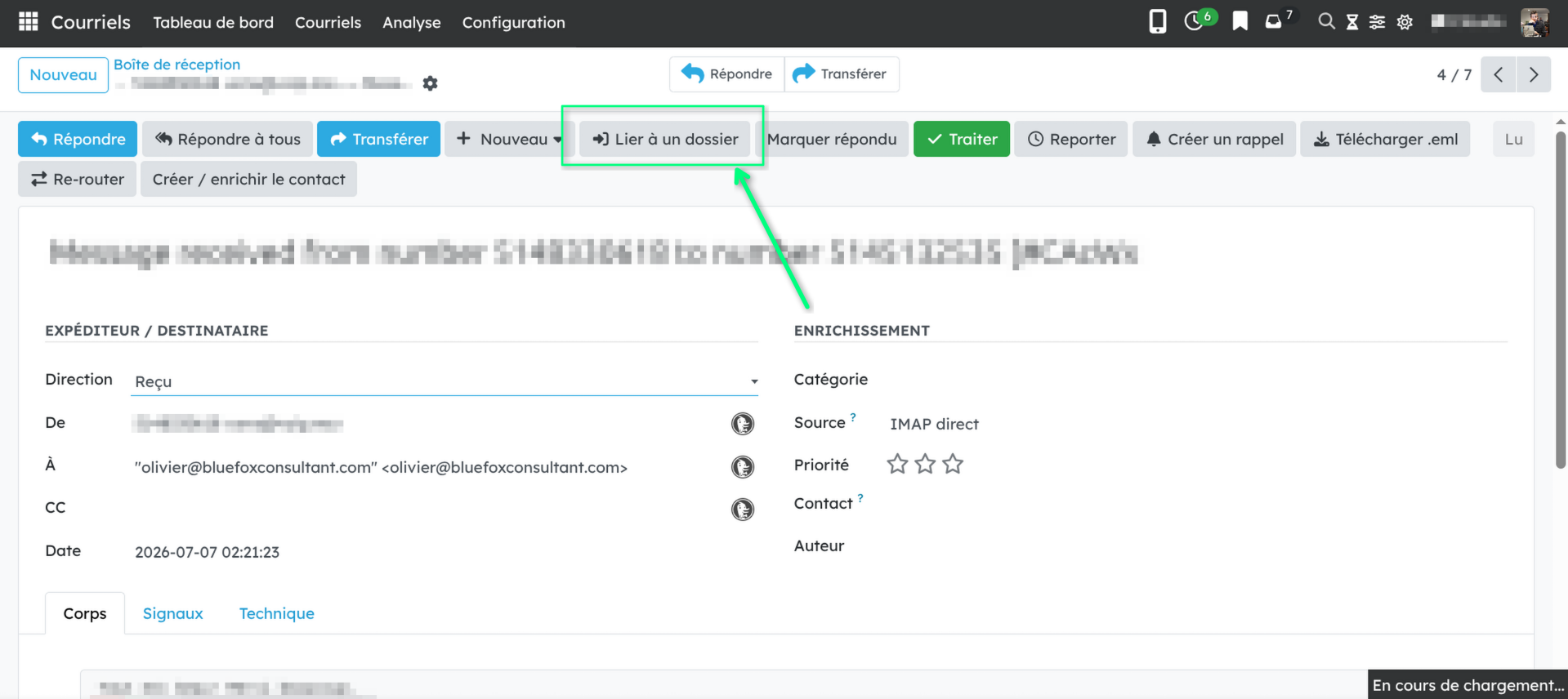
The centrepiece is the filing. An email that doesn't belong to any file yet is flagged as an "orphan": two clicks, and it joins the relevant task, ticket or invoice, with its full conversation thread and attachments. Better yet: if an email needs to become a new file, one click turns it into a task, a lead, a ticket, an expense or an invoice. The entire email, body and attachments, lands in the new file's history, not just a snippet pasted into a note. And you reply or forward without leaving Odoo, with your signature: the reply files itself in the right place.
The rest is everyday comfort: marking emails read, replied or handled, snoozing one until tomorrow morning, browsing your folders like in Thunderbird, doing everything from the keyboard. A reading pane opens next to the list, on the right or at the bottom as you prefer: click an email, read it, reply, file it, move to the next one. And a dashboard shows incoming volume, pending emails and average response time: numbers no personal mailbox will ever give you.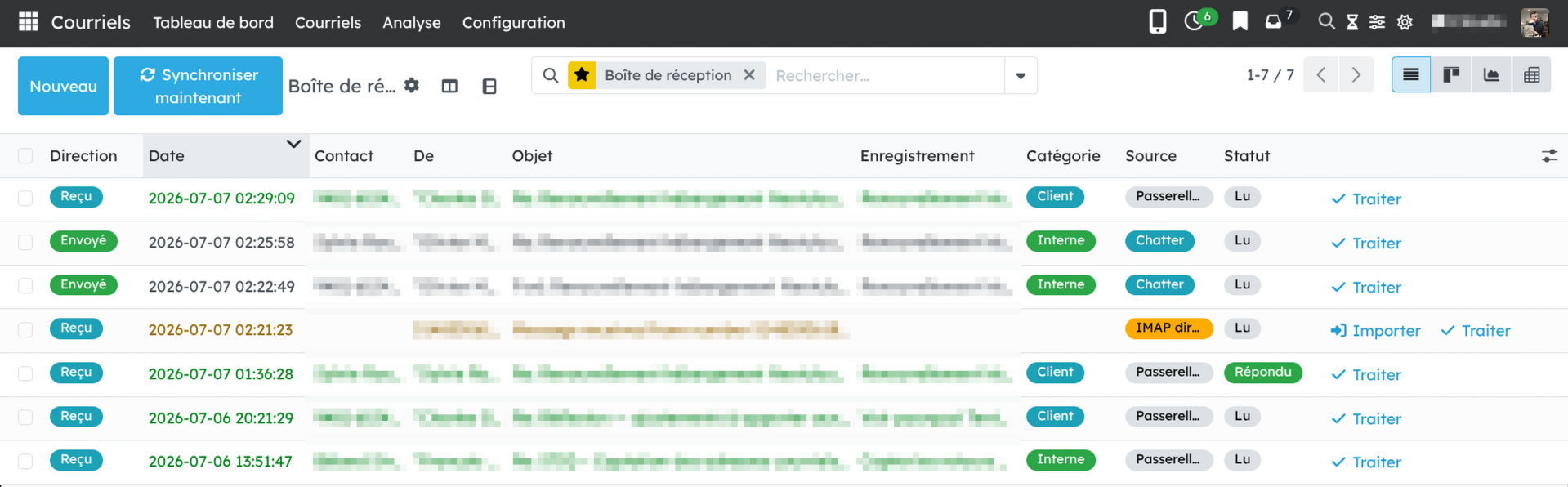
Sorting that takes care of itself
A newsletter, an automated notice, a "noreply": that kind of mail doesn't need your immediate attention. You write rules the way you would in Outlook: a list of conditions, a list of exceptions, then what you want to happen. “I am only in Cc and it came from outside, unless it is urgent” fits in a single rule. The module files, prioritises, moves to a folder, marks unread or clears the message out of the inbox on its own. Before you trust a rule, one button shows what it would catch across your last five hundred emails without changing a thing, and another applies it to mail that has already arrived. Your inbox keeps in view only what needs a real reply.
What changes when someone is away
The decisive test is absence. With history attached to the files, the colleague taking over opens the task and reads the whole correspondence, in order, without digging through anyone's mailbox. The new hire does the same on day one. And when a client claims "I wrote you about this in March", the answer is one click away, not in a former employee's archives.
It's the same principle we apply everywhere: information belongs to the file, not to the individual who received it.
Mind the email policy!
The module connects over IMAP, the open standard for accessing mailboxes. Microsoft 365, Gmail and independent providers like ours all speak it, but some business accounts have it disabled by internal policy: it has to be turned on first. Next, the phone: since mid-August an Android app carries the module's inbox, with filing into Odoo records, snoozes and attachments, and notifications that go through neither Google nor Firebase. It isn't downloaded from a public store, we install it with you. And it's not a bulk-sending tool: for newsletters, stick with a dedicated tool.
Then there's storage: keeping the full history of several mailboxes uses disk space. On properly sized hosting it's negligible, but a 50,000-email mailbox doesn't weigh nothing.
How we do it
We connect the module to your current email provider: no need to switch. That said, it's often the moment our clients start asking the bigger email questions: whether to host it themselves, and why some messages end up in junk. The three topics go well together: once you take email seriously as infrastructure, you might as well do it properly.
If your client history is scattered across four Outlook mailboxes, let's talk about your email.
Sources
- The
bf_email_managementmodule on our GitHub repository and its card on our modules page - IMAP (RFC 9051): the open standard used to connect to your mailbox