TL;DR
Since October 14, 2026, Windows 10 Extended Security Updates (ESUs) are in their second year. Because they're cumulative, a device that enrolls now pays US$183, and year 3, the last one, will cost twice as much as year 2.
Many computers still on Windows 10 are turned away by Windows 11 only because of their processor or their TPM chip. Blue Fox OS, a free Linux managed from Symbifox, puts them back to work: you scan a QR code, the workstation installs itself, in your organization's colours and with each user's personal touch.
It also replaces Microsoft's workstation management: no Active Directory, no Intune, no Group Policy, and Entra ID only if you keep Microsoft 365. Accounts move to Authentik, workstation rules to a Symbifox record. No licence fees, and it needs less hardware than Windows 11.
Downloads: a two-sided handout for the decision-maker and the IT administrator, and a spreadsheet that works out your licences for your own fleet.
In this article
- Windows 10 in October 2026: three paths, three bills: enrolling in ESUs now costs US$183 per device, and year 3 will cost twice as much as year 2.
- Why Windows 11 turns away computers that work perfectly well: a processor older than 2018 or no TPM 2.0 is enough, and Canalys projected up to 240 million PCs ending up as waste.
- The real numbers for a 25-workstation SMB: for 10 refused computers, about $17,994 for ESUs then replacement, $12,000 to replace now or $1,940 with Blue Fox OS.
- What replaces Active Directory, Entra ID, Intune and Group Policy: Authentik and a Symbifox record do the job, but with no remote wipe and no tool like Defender.
- One QR code, and the workstation installs itself: one sign-in on the phone, then the machine sets language, keyboard, encryption and apps on its own.
- Less demanding than Windows 11, with no licence fees: 2 GB of memory and 15 GB of disk at minimum, TPM optional, and no licence to pay.
- The live USB key: your desktop, on any computer: version 1.1.0 opens your desktop on a borrowed computer, and a lost key is revoked remotely.
- Other organizations have done it before you: the Gendarmerie succeeded, Schleswig-Holstein is moving ahead, and Munich went back to Windows for lack of preparation.
- The trade-offs to know before you start: Windows-only software, the required servers and the pace of fixes come before anything else.
- Your 30-day game plan: sort the fleet, price the three paths and pilot two or three computers before ESU year 3.
- At Blue Fox: the system is free software, and a 45-minute demo shows a computer following its record.
On October 13, the first year of Windows 10 Extended Security Updates came to an end. For an organization that put the decision off, the math just changed: Microsoft doesn't sell year 2 on its own. A device that enrolls today pays for the year it missed on top of the current one, US$183, and year 3 will cost twice as much as year 2.
In Canada, roughly one in five Windows computers browsing the web still runs Windows 10, according to StatCounter. They aren't all worn-out machines. Plenty of them run just fine and are refused Windows 11 for one reason only: a processor older than 2018 or an older-generation security chip.
We introduced Blue Fox OS in a first article in September. This one takes the budget angle: what the three possible paths cost for these computers, what actually replaces Microsoft's management tools, and how to decide in 30 days.
Windows 10 in October 2026: three paths, three bills
For every computer Windows 11 turns away, three options remain. Pay for Extended Security Updates (ESU), replace the computer, or change operating systems. The first two come with a price you can know in advance.
| ESU year | Period covered | Price of the year, per device | To enroll now |
|---|---|---|---|
| Year 1 | October 14, 2025 to October 13, 2026 | US$61 (about C$86) | Over, but still owed |
| Year 2 | October 14, 2026 to October 12, 2027 | US$122 (about C$171) | US$183 for years 1 and 2 (about C$257) |
| Year 3, the last one | October 13, 2027 to October 10, 2028 | US$244 (about C$343) | US$427 in all (about C$599) |
Microsoft publishes the year 1 price and the rule: the price doubles every year. The year 2 and year 3 amounts follow from that. The conversion uses the Bank of Canada rate of October 27, 2026 (1.4038), and Microsoft publishes no Canadian-dollar price for this program: it's sold through volume licensing or a partner.
Two clarifications head off confusion. The consumer program, free under conditions (otherwise US$30), is for individuals, not organizations. And schools pay a separate rate of US$1, $2, then $4 a year. For an SMB or a non-profit, the full price applies.
Above all, ESUs buy time and nothing more. In October 2028, the same computer will still need to be replaced or switched to another system. Paying for all three years means financing a delay.
Why Windows 11 turns away computers that work perfectly well
Windows 11 asks for little memory and disk: 4 GB and 64 GB. The blockers are two hardware requirements. The processor has to be on Microsoft's list, which starts at 8th-generation Intel Core (late 2017) and AMD Ryzen 2000. And the computer needs a TPM 2.0 chip, the hardware vault that protects encryption keys. In December 2024, Microsoft called that requirement "non-negotiable". Microsoft has announced no softening of it.
The result: laptops from 2016 or 2017, often bought high-end, with 8 or 16 GB of memory, are declared ineligible. In 2023, the firm Canalys estimated that about one PC in five, up to 240 million devices worldwide, could end up as waste because of the end of Windows 10. It was a projection and nobody has counted since, but the order of magnitude stands.
The cost that doesn't show up on the invoice
According to the United Nations Global E-waste Monitor 2024, the world produced 62 billion kilos of e-waste in 2022, and only 22.3% was collected and recycled in a documented way. Canada produced 770 million kilos, about 20 kg per person.
For a laptop, most of the carbon footprint is already spent the day you buy it. Dell's datasheet for a Latitude 5440, a common business laptop, attributes 83% of its roughly 290 kg of CO2 equivalent to manufacturing, over four years of use in Europe. In Quebec, where electricity is low-carbon, manufacturing weighs even more heavily in the total. The European Environmental Bureau calculated that extending the life of every laptop in the European Union by one year would avoid 1.6 million tonnes of CO2 a year by 2030.
Keeping a computer that works is the cheapest and the leanest decision. It still has to stay secure and manageable.
The real numbers for a 25-workstation SMB
Take an organization of 25 people, one computer each. Fifteen computers already run Windows 11. The other ten are refused, and four of them still have a mechanical hard drive. We compare the three paths through October 2028, the final end of ESUs.
| For the 10 refused computers | Pay for ESUs | Replace now | Move to Blue Fox OS |
|---|---|---|---|
| Cost through October 2028 | about $5,994 | $12,000 | about $1,940 |
| What the amount covers | ESU years 1, 2 and 3, at $599 per device | Ten new laptops at $1,200 | Four SSDs at $60 and two hours per computer at $85 an hour |
| In October 2028 | You still have to replace: another $12,000 | Nothing more | Nothing more, as long as the hardware holds up |
| Operating system licence | Windows 10, already paid for | Included in the PC price | None |
The price of a laptop, of an SSD and the hourly rate are assumptions to replace with your own. These amounts also assume Symbifox and Authentik are already running. Otherwise, add their setup and hosting.
That's what the spreadsheet offered below is for: it redoes the math with your fleet, your prices and your time horizon, and it adds workstation management, which comes back every month. With the example above and two years of management, it comes to about $24,474 for ESUs followed by replacement, $18,480 for immediate replacement and $5,828 for Blue Fox OS, with management of the whole fleet included (all 25 computers, including the 15 that stay on Windows 11).
The bill that comes back every month: managing the computers
The operating system is only part of the spend. To enroll computers, push settings, encrypt disks and keep recovery keys, an SMB on Microsoft also pays for management tools. The prices below are Microsoft Canada's, in effect since the July 1, 2026 increase, on an annual commitment.
| To manage 25 computers | Per person, per month | Per year |
|---|---|---|
| Microsoft 365 Business Premium instead of Business Standard (adds Entra ID P1, Intune and Defender) | $10.80 more | $3,240 |
| Entra ID P1 and Intune Plan 1 bought on their own | about $20.73 | about $6,219 |
| On-premises Active Directory | A server, a Windows Server 2025 Standard licence (US$1,176) and an access licence per person | Varies |
| Free Authentik and the Symbifox Policy module, self-hosted | $0 | $0, plus your hosting |
Only the computers that move to Blue Fox OS leave this bill. Computers that stay on Windows, phones and email protection stay under Microsoft licences. Business Premium also includes Defender for Business, a protection tool that Blue Fox OS doesn't replace. And if Blue Fox hosts Symbifox for you, it costs $25 to $28 per person per month ($45 for a single person), but that price covers the whole management suite, not just the computers. For an organization that doesn't have Symbifox yet, moving the whole fleet then costs more than replacing ten computers. An SMB that keeps Microsoft 365 for email can also drop to Business Basic ($9.50), which includes Office on the web: the Office desktop apps don't install on Linux.
What replaces Active Directory, Entra ID, Intune and Group Policy
The question we hear most often: "If we leave Windows, what does the job of our Microsoft tools?" Here's the mapping, piece by piece, including what's missing.
| With Microsoft | With Blue Fox OS | Worth knowing |
|---|---|---|
| Active Directory or Entra ID: accounts, groups, two-factor authentication | Authentik, a free identity provider | One identity for the computer, Nextcloud and Symbifox |
| Group Policy and Intune profiles | The Symbifox Policy module: one record for the organization, exceptions per person | Each computer rereads its record at startup, then every day |
| Windows Autopilot: zero-touch setup | QR code setup, approved on the phone | Identification happens before the disk is touched. It takes a USB key and someone at each computer |
| BitLocker, recovery key kept in Entra ID | Disk encrypted from installation, recovery passphrase in escrow in Symbifox, if you turn it on | Only the custodian reads it, and every read is dated and attributed |
| Windows Update for Business | Automatic all-or-nothing updates, with rollback to the previous version | The system is read-only and doesn't drift |
| App deployment through Intune | App list in the record: add an app and it installs, remove it and it disappears | For everyone or for a single person |
| Device inventory | List of enrolled machines in Symbifox, each tied to its person | A revoked machine is cut off at its next sync |
| Remote wipe | No equivalent | Revoking cuts the machine off, but doesn't erase it |
On the identity side, we covered the move in detail in our article on migrating from Active Directory to Authentik. What Blue Fox OS adds is the other half: what Group Policy used to do on the workstations. The code of the Symbifox modules is published on GitHub under the Business Source License 1.1: readable, verifiable and free for your own organization.
One QR code, and the workstation installs itself
The person doing the install boots the computer from the key, picks the automatic installation and confirms the organization name on screen. Then the screen shows a QR code. They scan it with their phone and sign in with their usual account and two-factor authentication. That's all we ask of them.
The machine then knows who it belongs to and does the rest: language, keyboard, time zone, machine name, disk encryption. At first startup, Brave, Thunderbird, the Nextcloud client and Bitwarden are already installed, and the apps added to the record follow. If the network drops along the way, the installation doesn't stop: it falls back on the organization's default settings.
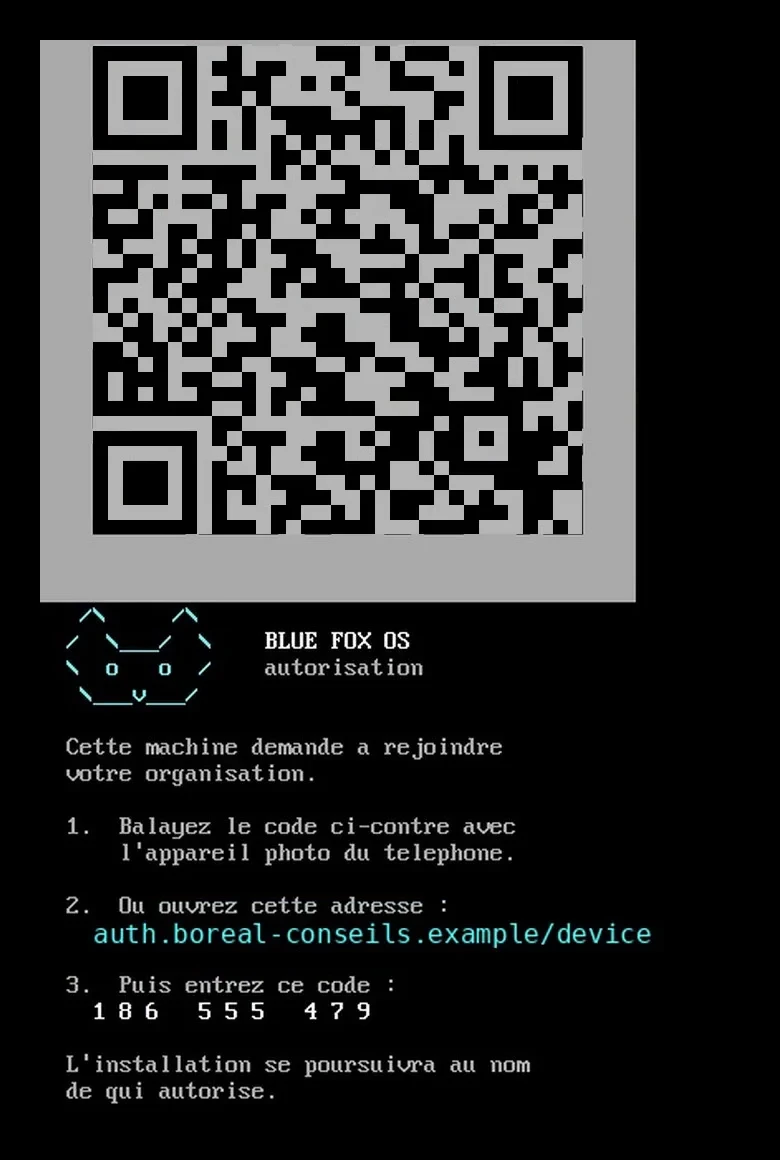
The installer's authorization screen, shown here in French: scan the code with the phone, or type the address and code shown. Fictitious organization.
In your organization's colours
The boot screen, the installer, the login screen and the desktop carry the organization's brand: logo, wallpaper, accent colour, and the team's web apps pinned to the taskbar. A new employee recognizes their work environment from the moment they power on.
And with each person's personal touch
The common rule applies to everyone, and exceptions to whoever needs them. Your accountant needs LibreOffice and the others don't: you add it to their exceptions. A colleague works with a supplier in Vancouver: she gets a second time zone. Everyone picks a 12-hour or 24-hour clock, keeps their own browser extensions, and their photo comes from their employee record.
These choices live in the record, not on the machine. The day the computer is replaced, the person gets their apps and settings back without reconfiguring anything.
Less demanding than Windows 11, with no licence fees
Blue Fox OS is built on Fedora Kinoite and the KDE Plasma desktop. The official minimum requirements show the gap.
| Minimum requirement | Windows 11 | Fedora, the base of Blue Fox OS |
|---|---|---|
| Processor | Microsoft's list: Intel 8th generation, AMD Ryzen 2000 and newer | Dual core at 2 GHz, no list |
| Memory | 4 GB | 2 GB |
| Storage | 64 GB | 15 GB |
| TPM chip | TPM 2.0 mandatory | Used if present, optional |
| Licence | Windows 11 Pro: $259.99 at the Microsoft Store Canada | None, ever |
Without a TPM 2.0 chip, Blue Fox OS still installs. The disk stays encrypted by default, and the person then types, at every startup, a passphrase the custodian gives them. The organization can also choose, with eyes open, not to encrypt a computer that never leaves the office.
These minimums are Fedora's. For everyday Blue Fox OS use, we recommend 8 GB of memory and an SSD. On an old PC, the weak point is most often the mechanical hard drive: Blue Fox OS downloads its updates in blocks of several gigabytes, and a hard drive makes them slow. An entry-level SSD costs a few dozen dollars and changes the experience completely. Budget for it from the start.
The live USB key: your desktop, on any computer
New in version 1.1.0: the same Blue Fox OS runs from a USB key, with nothing to install. For a borrowed computer, a spare workstation or a trip, you boot from the key, scan a QR code with your phone, two-factor authentication included, and your desktop opens.
You then choose where that desktop lives. In an ephemeral session, everything is wiped at shutdown and your files stay in Nextcloud. Kept on the key, the desktop is encrypted and waits for the next session. Kept in Nextcloud, it follows the person on any key: you can lose the key, not your desktop.
And if the key gets lost? The organization revokes the key remotely, and the encrypted desktop it holds becomes unreadable. You need a 64-bit computer that boots in UEFI, an internet connection to open the session, and an 8 GB key, or 16 GB to keep your desktop on it. Two short videos on the Blue Fox OS website show a workstation being installed and the key at work.
Other organizations have done it before you
Running a fleet of Linux workstations isn't a lab experiment. A few public cases, with their successes and their lessons.
- France's Gendarmerie nationale moved its workstations to Ubuntu starting in 2008. By the end of 2018, it had more than 73,000 Linux workstations against about 8,000 on Windows, and the effort has now run for more than fifteen years.
- The German state of Schleswig-Holstein is targeting about 30,000 workstations. Nearly 80% of its workstations, outside the tax administration, have already swapped Microsoft Office for LibreOffice, saving more than €15 million in licences a year, and nearly 44,000 mailboxes moved to free software. The transition also caused public friction with the courts, a reminder that a workstation change has to be prepared with the people who use it.
- The City of Munich had nearly 15,000 workstations on Linux in 2013, then went back to Windows starting in 2017. An external audit put the problems mostly down to organization and fleet management, not the system itself. That's the lesson to keep: a poorly prepared migration fails, whatever the system.
In Quebec, the policy statement on digital sovereignty and IT procurement published in February 2026 sets the goal of strengthening the use of free software across government. We haven't found, so far, a Quebec municipality or public body that has migrated its workstations. The field is open for SMBs and non-profits that want to try at a small scale.
The trade-offs to know before you start
Software that only exists on Windows. It's obstacle number one. Locally installed accounting software, a payroll app, the driver for a specialized device: one is enough to keep that computer on Windows. Blue Fox OS doesn't manage Windows computers, it replaces them.
You need the servers. Zero-touch setup reads its record in Symbifox and checks identity in Authentik. Without them, you get a Linux in your colours, not a managed workstation. If you have neither, it's an infrastructure project before it's a workstation project.
No remote wipe, no detection tool like Defender. Revoking a computer cuts it off from its configuration and its access, but it keeps what it already received. The read-only system shrinks the attack surface, without replacing a managed detection solution. Our article on antimalware solutions goes over the options for Linux.
Some settings are fixed at installation. The machine name, the language and the keyboard stay the ones set at the start, even if the record changes later.
Fixes arrive by image. Computers apply updates on their own, but Fedora fixes only reach them when Blue Fox publishes a new signed image, which it has done every week since late October 2026.
The project is young. Version 1.0.0 dates from September 2026. It has been tested on trial machines, not over years of a production fleet. So you start with a pilot.
Your 30-day game plan
The goal: to know, before paying for another year of ESUs, which computers can move, which must stay on Windows and which deserve to retire.
- Week 1, sort the fleet into three piles. Computers already Windows 11 compatible, those refused but still solid, and those that are truly worn out. The downloadable handout lists the checks to run on each computer.
- Week 1, list the Windows software. For each person in the second pile, note what only exists on Windows and check whether there's a web version. Computers that depend on it stay on Windows, and that's fine.
- Week 2, price the three paths. Enter your fleet and your prices in the spreadsheet. Compare ESUs, replacement and Blue Fox OS, with the management licences that come back every month.
- Weeks 2 and 3, install two or three pilot computers. Pick people who work mostly in the browser, email and Nextcloud. Fill in the record in Symbifox, prepare the key, and plan an SSD for every mechanical hard drive.
- Week 4, measure. Installation time, number of help requests and the software that was missing. Those three measures tell you whether to extend the pilot before ESU year 3, or stop there.
And if the pilot doesn't work out? The computer can be reinstalled with Windows like any other, and the files stayed in Nextcloud. Nothing is locked into the workstation.
Two tools to help you decide
The Blue Fox OS handout for the decision-maker and the administrator (PDF, 2 pages): dates and costs on one side, inventory, prerequisites and pilot on the other. Print it or forward it to your IT lead.
The licence cost spreadsheet (Excel): enter your number of computers, your prices and your horizon, and it compares ESUs, replacement and Blue Fox OS, management licences included.
At Blue Fox
Blue Fox OS is a free software project: the system and its installer are published as open source, and the ISOs, live key included, can be downloaded with their checksum and signature from the download page. If you already use Symbifox, your workstations can draw their configuration from it today.
The simplest way to judge is to see it. In 45 minutes, by video call, we install a workstation in front of you: you change the record and watch the computer follow. Book a Blue Fox OS demo, or, if your Windows 10 fleet raises a broader question, let's talk about your fleet.
Sources
- Microsoft Learn, Windows 10 ESU program: US$61 per device for the first year, ESUs are cumulative
- Microsoft Tech Community, when to use Windows 10 ESUs: the price doubles every year
- Microsoft Learn, Extended Security Updates FAQ: dates of the three years
- Microsoft Education, ESU for education: US$1, $2 and $4 a year
- Microsoft, ESU for individuals: the consumer program, separate from the one for organizations
- Bank of Canada, daily exchange rates: C$1.4038 per US$1 on October 27, 2026
- StatCounter, Windows versions in Canada: Windows 10 at about 20% of web traffic from Windows desktops, October 2026
- Microsoft, Windows 11 specifications: processor, memory, storage, UEFI and TPM 2.0
- Microsoft Learn, Intel processors supported by Windows 11: from the 8th generation on
- Microsoft Tech Community, TPM 2.0 for Windows 11: the requirement called non-negotiable, December 2024
- Canalys, end of Windows 10 support and e-waste: projection of 240 million PCs, December 2023 (archived copy)
- Global E-waste Monitor 2024 (UNITAR and ITU): 62 billion kg in 2022, 22.3% recycled, Canadian data
- Dell, Latitude 5440 carbon footprint: 290 kg of CO2 equivalent, 83% from manufacturing
- European Environmental Bureau, Coolproducts report: one more year of life for EU laptops, 1.6 Mt of CO2 a year
- Microsoft 365 for business, plans and pricing in Canada: Business Basic, Standard and Premium
- Microsoft Entra pricing in Canada: Entra ID P1 at $9.50 per person per month
- Microsoft Intune pricing: Intune Plan 1 at US$8 per person per month
- Microsoft, Windows Server 2025 pricing: Standard edition at US$1,176 for 16 cores
- Microsoft Store Canada, Windows 11 Pro: $259.99
- Authentik pricing: free open source edition, Enterprise edition at US$5 per person per month
- Fedora, hardware requirements: 2 GB of memory and 15 GB of disk (archived copy)
- Symbifox pricing: free when self-hosted, $25 to $28 per person per month when hosted
- BlueHats, the Gendarmerie workstation (in French): 73,351 workstations on Linux and 8,180 on Windows, December 2018
- State of Schleswig-Holstein, press release on digital sovereignty (in German): nearly 80% of workstations off Microsoft Office outside the tax administration, December 2025
- heise, Schleswig-Holstein relies on open source and saves millions: €15 million in licences saved every year
- Borncity, Schleswig-Holstein's state chancellery moves to Linux (in German): 30,000 workstations targeted
- it-daily, Schleswig-Holstein's open source course (in German): the courts' letter to the minister
- Open Source Observatory, Munich's history: LiMux, the return to Windows and its causes
- Government of Quebec, policy statement on digital sovereignty and IT procurement (in French): February 2026
- Blue Fox OS, official website: videos, live USB key and downloads